DevOps Automation

Website Availability Monitor → Telegram Alert

Automated uptime monitoring workflow in n8n that checks availability every 5 minutes and sends alerts on errors.
n8n DevOps Telegram API Monitoring

Context & Problem

Business Case

Websites may become unreachable, return 404 / 500 / 503 errors, or fail silently without immediate awareness. Manual monitoring is unreliable and inefficient for production systems.

The Challenge: We needed a solution that runs automatically, detects issues instantly, and notifies the team immediately via Telegram without generating false alarms.

Goal: Build an automated workflow that checks website status every 5 minutes and sends a Telegram alert only if the site returns an error status code (≥ 400).

Implementation

Architecture & Logic

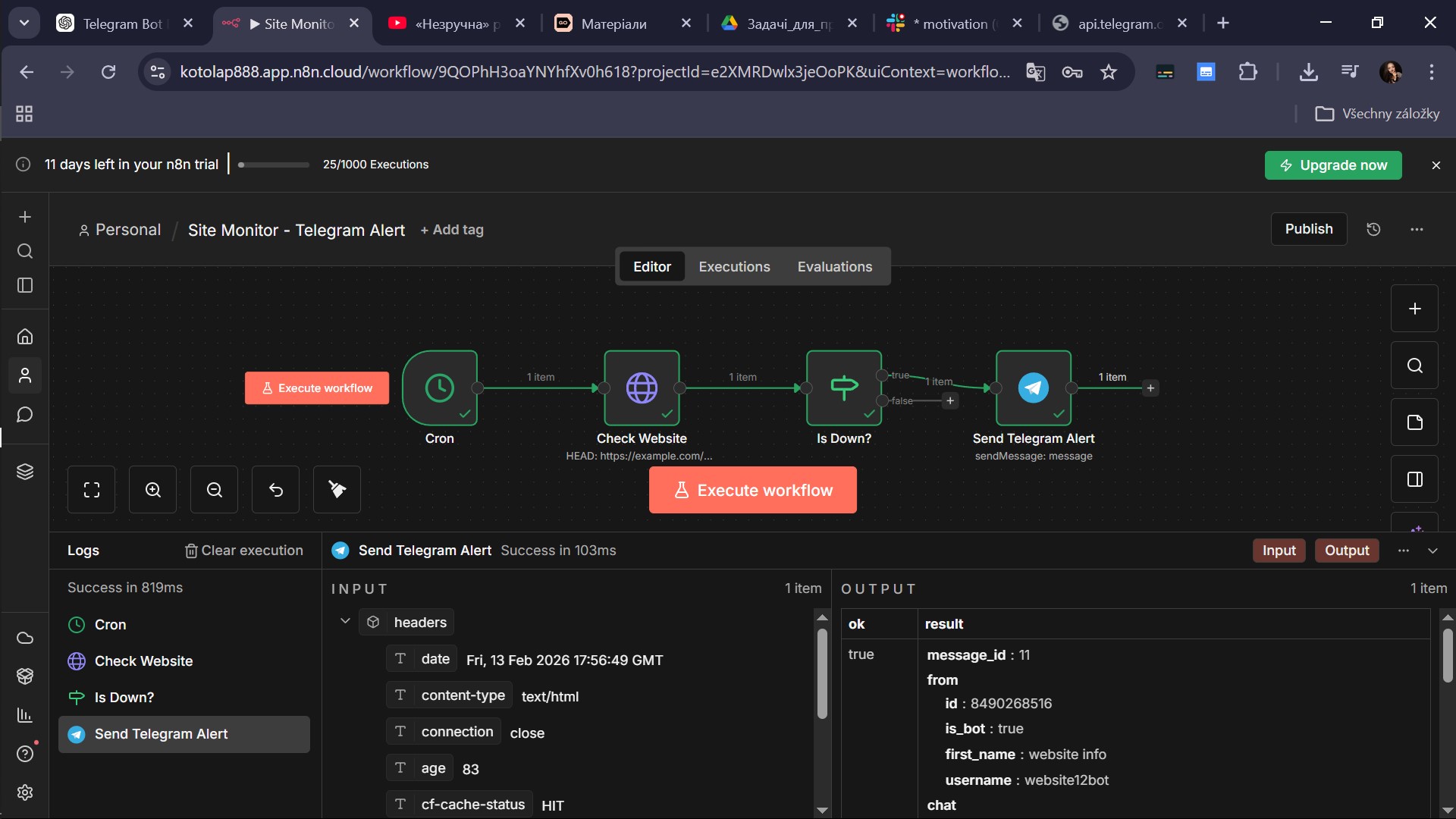
The workflow is built in n8n following a linear logic: Cron Trigger → HTTP Request (HEAD) → IF Node → Telegram Alert. It uses a HEAD request for lightweight checking and evaluates status codes to determine if the site is down.

Workflow Architecture: Cron, HTTP, IF, Telegram
Fig 1. n8n Workflow Architecture
Telegram Message Template
🚨 WEBSITE INCIDENT DETECTED

🔗 URL: {{$node["Check Website"].parameter.url}}
📡 Status Code: {{$node["Check Website"].json.statusCode}}
🕒 Timestamp: {{$now}}

⚠ The website is currently unreachable or responding with an error.
Please review server availability, hosting status, and application logs.
Output & Results

Real Production Case
Telegram Alert Example
Fig 2. Actual Telegram Alert received
Technical
  • HEAD request (Lightweight)
  • 5-minute automation
  • Status ≥ 400 detection
Logic
  • No false positives
  • Continue on Fail enabled
  • Clean alert formatting
Business Value
  • Immediate incident detection
  • Reduced downtime impact
  • Fully automated supervision

Export Workflow

Download the ready-to-use n8n workflow JSON file. Import it directly into your n8n instance.